How to Convert Any Address on Earth to Coordinates
Convert any address to coordinates — from simple US addresses to Japanese block-lot to Costa Rican landmarks. Free tool, API, and Python SDK.
This is Part 4 of our Address to Coordinates series. Read Part 1: Will Geocoding Decide the War Between Humans and AI?, [Link: Part 2: The House Number Problem | /blog/house-number-problem-geocoding], and [Link: Part 3: 200 Countries, 200 Ways to Write an Address | /blog/200-countries-address-formats-geocoding] for the full context.
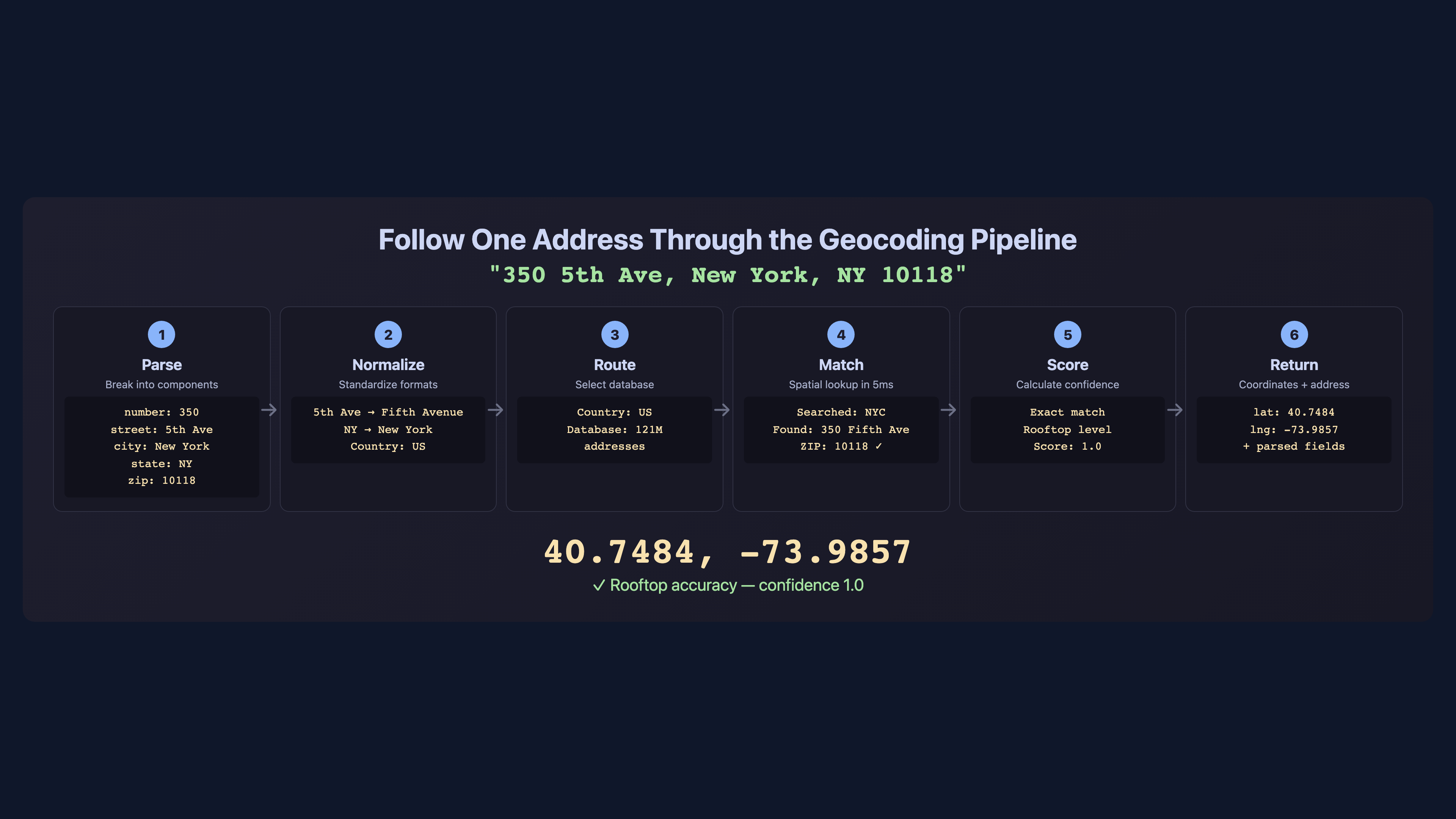
You’ve read about the complexity. You know that house numbers have 20+ formats, that 200+ countries each have unique address conventions, and that 135,000 component combinations make geocoding one of the hardest data problems on Earth. Now let’s solve it.
This article is the practical guide. Three methods, from zero-code to full API integration. By the end, you’ll be able to convert any address on Earth — from a simple American street address to a Japanese block-lot to a Brazilian metric distance — into precise latitude and longitude coordinates.
Step 1: Free Online Lookup — Convert One Address in Seconds
The fastest way to geocode an address is the free online tool at csv2geo.com/batchgeocoding. No sign-up, no API key, no code. Just type an address and get coordinates.
Let’s test it with five international addresses that represent the complexity we discussed in Parts 2 and 3:
| Address | Country | Format Challenge | Expected Result |
|---|---|---|---|
| 350 5th Avenue, New York, NY 10118 | US | Standard format | 40.7484, -73.9857 |
| Friedrichstraße 43, 10117 Berlin | DE | Number after street | 52.5163, 13.3889 |
| 10 Downing Street, London, SW1A 2AA | UK | Alphanumeric postcode | 51.5034, -0.1276 |
| Av. Paulista, 1578, São Paulo, SP | BR | Metric house number | -23.5614, -46.6558 |
| Calle Gran Vía 28, 28013 Madrid | ES | Floor+door format region | 40.4203, -3.7059 |
Each of these addresses uses a different format, a different language, and a different numbering convention. The geocoder must parse, normalize, and match each one against the correct country dataset. A system that handles all five correctly is handling the hard cases, not just the easy ones.
The free online tool supports single address lookup — type or paste your address, select the country, and get instant results with a confidence score. For multiple addresses, use Step 2.
What makes this different from typing an address into Google Maps? Two things. First, you get a structured result with exact coordinates and a confidence score — not just a pin on a map. Second, the system searches 744M+ addresses across 200+ countries using eight search strategies (the same ones we described in Part 3), including handling for German compound street names, Brazilian metric house numbers, and Japanese block-lot formats. Google Maps handles the common cases well. CSV2GEO handles the cases that break Google Maps.
Step 2: Batch Geocode a CSV or Excel File
For geocoding dozens, hundreds, or thousands of addresses at once, batch processing is the way to go. Here’s the step-by-step process:
Step 1: Prepare your file. Create a CSV or Excel file with your addresses. You can use a single "full address" column or separate columns for street, city, state, postal code, and country. Separate columns give better results because the geocoder doesn’t have to guess where one component ends and another begins.
Step 2: Upload. Go to csv2geo.com/batchgeocoding and upload your file. The system accepts CSV, XLS, XLSX, and TSV formats. Maximum file size depends on your plan — free tier supports up to 100 rows per day.
Step 3: Map your columns. The interface shows your column headers and asks you to map them to address components: street, house number, city, state, postal code, country. If you have a single "full address" column, map it to the "address" field and the system will parse it automatically.
Step 4: Process. Click "Start Geocoding." For small files (under 50 rows), results appear in seconds. Larger files are processed in the background — you’ll get an email when they’re done.
Step 5: Download results. Your original file is returned with new columns added: latitude, longitude, confidence score, and matched address. The confidence score (0 to 1.0) tells you how precise each match is.
Pro tip: always include the country code or country name in your data. An address like "123 Main Street" exists in hundreds of cities across dozens of countries. Without the country, the geocoder has to guess — and guessing means lower confidence scores.
For detailed walkthroughs, see the CSV geocoding guide and the Excel geocoding guide.
Step 3: Geocoding API for Developers (Python, cURL, JavaScript)
For automated workflows, applications, and large-scale processing, the CSV2GEO API provides 18 endpoints for forward geocoding, reverse geocoding, and batch operations. Free tier: 3,000 requests per day, no credit card required.
Single address geocoding with cURL:
curl -s "https://csv2geo.com/api/v1/geocode" \
  -G \
  -d "q=350+5th+Ave,+New+York,+NY+10118" \
  -d "country=US" \
  -d "api_key=YOUR_API_KEY"
Python SDK example:
from csv2geo import Client

client = Client(api_key="geo_live_your_key_here")

# Single address
result = client.geocode(
    "Friedrichstraße 43, 10117 Berlin",
    country="DE"
)
print(f"Lat: {result.latitude}, Lon: {result.longitude}")
print(f"Confidence: {result.confidence}")

# Batch geocoding — up to 10,000 addresses per request
addresses = [
    {"q": "350 5th Ave, New York", "country": "US"},
    {"q": "Friedrichstraße 43, Berlin", "country": "DE"},
    {"q": "10 Downing Street, London", "country": "GB"},
    {"q": "Av. Paulista 1578, São Paulo", "country": "BR"},
    {"q": "Calle Gran Vía 28, Madrid", "country": "ES"},
]
results = client.batch_geocode(addresses)

for r in results:
    print(f"{r.query} → {r.latitude}, {r.longitude} ({r.confidence})")
Batch endpoint — process up to 10,000 addresses in a single API call:
curl -s "https://csv2geo.com/api/v1/batch" \
  -X POST \
  -H "Content-Type: application/json" \
  -d '{
    "api_key": "YOUR_API_KEY",
    "addresses": [
      {"q": "350 5th Ave, New York", "country": "US"},
      {"q": "Friedrichstraße 43, Berlin", "country": "DE"},
      {"q": "10 Downing Street, London", "country": "GB"}
    ]
  }'
Get your free API key at csv2geo.com/api-keys. Full documentation, rate limits, and endpoint reference at the API docs.
Step 4: Handling International Address Formats Correctly
After three articles exploring the complexity of global addresses, here are the practical tips that will immediately improve your geocoding results:
Always include the country. This is the single most impactful thing you can do. With the country, the geocoder knows which address format rules to apply, which database to search, and which language to expect. Without it, everything is ambiguous.
Use structured columns when possible. Instead of one "full address" column, split your data into street, house number, city, postal code, and country. This eliminates parsing ambiguity. The geocoder doesn’t have to guess that "43" in "Friedrichstraße 43" is a house number, not a street name.
Handle encoding correctly. Use UTF-8 encoding for your files. Characters like ß (German eszett), é (French accent), ã (Portuguese tilde), and ñ (Spanish ñ) must be preserved. If your CSV was exported with Latin-1 encoding, these characters will corrupt and the geocoder will fail to match.
Format postal codes as text. Australian postcodes with leading zeros (0200), UK alphanumeric codes (SW1A 2AA), and Brazilian CEPs with hyphens (01310-100) will all break if your spreadsheet treats the postal code column as a number. Always format it as text before saving.
Preview before processing. Upload a small sample (10–20 rows) first. Check the confidence scores. If most results are below 0.5, your data may need cleaning before full processing. Common issues: wrong country, truncated postal codes, and merged address fields.
Step 5: Understanding Geocoding Confidence and Relevance Scores
Every geocoded result includes a confidence score from 0 to 1.0. This score is not a binary "found/not found" — it tells you exactly how precise the match is and what level of geographic accuracy you can expect.
| Score Range | Precision Level | What It Means | Typical Use |
|---|---|---|---|
| 1.0 | Rooftop | Exact building matched. Coordinates point to the building’s footprint. | Delivery, navigation, property analysis |
| 0.8–0.99 | Near-rooftop | Street and number matched with high confidence. May be interpolated between known points. | Routing, CRM enrichment, field operations |
| 0.5–0.79 | Street-level | Street was found but exact house number was not. Coordinates are on the correct street. | Area analysis, approximate mapping |
| 0.3–0.49 | Postal code / district | Matched to a postal code or district centroid. Building-level precision not available. | Regional analysis, heatmaps |
| Below 0.3 | City / area | Only the city or broad area was identified. Use with caution for any precision-dependent application. | Country-level aggregation only |
The relevance score is your quality indicator. For delivery and navigation, you want 0.8 or above. For spatial analytics and heatmaps, 0.5+ is usually sufficient. For any application where lives depend on accuracy — emergency dispatch, insurance underwriting — insist on 0.9+.
When you download your geocoded results from CSV2GEO, sort by confidence score and review the low-scoring rows. Often, a small data fix (adding a country code, correcting a postal code) can bump a 0.3 to a 0.9. The score tells you where to focus your cleanup effort.
What to Do After Converting Addresses to Coordinates
Coordinates are not the destination — they’re the starting point. Once your addresses are converted to latitude and longitude, entirely new capabilities unlock:
Plot on Maps
Import your geocoded data into Google Maps, Mapbox, Leaflet, or any GIS tool. Each row becomes a pin on a map. Visualize customer distribution, store locations, asset positions, or any geographic dataset.
Calculate Distances
With two coordinate pairs, calculate the distance between any two points on Earth using the Haversine formula. Find the nearest store to each customer, the closest warehouse to each delivery, or the distance between any two addresses.
Route Optimization
Feed geocoded addresses into routing algorithms to find the fastest path through multiple stops. Delivery fleets, field sales teams, and service technicians all rely on geocoded addresses for route optimization.
CRM Enrichment
Add latitude and longitude to your customer records. Build territory maps, identify geographic clusters, segment by region, and plan field visits. A spreadsheet of addresses becomes a visual strategy.
Geofencing
Define geographic boundaries around locations and trigger actions when someone enters or exits. "Send a notification when a customer is within 200m of our store" — powered by geocoded store coordinates.
Spatial Analytics
Overlay geocoded data with geographic layers: flood zones, census tracts, school districts, crime statistics, property values. Every spatial analysis starts with converting addresses to coordinates.
Need to go the other direction? Convert coordinates back to street addresses with [Link: reverse geocoding | https://csv2geo.com/reversegeocoding]. This is essential for GPS tracking, mobile check-ins, and IoT devices that report coordinates instead of addresses.
The key insight is that geocoding is not a one-time operation. Customer addresses change, new buildings appear, postal codes are reassigned, and your data grows. The most successful teams treat geocoding as an ongoing data pipeline — new records are geocoded on arrival, existing records are re-geocoded periodically, and confidence scores are monitored as a data quality metric. The CSV2GEO API makes this easy: integrate it into your ETL pipeline, webhook handler, or CRM sync process, and every address that enters your system gets coordinates automatically.
When Every Geocoding Provider Fails
Here is something the geocoding industry does not talk about: for many countries, even the most expensive providers return coordinates for only 45–55% of addresses. Google, HERE, Mapbox — it does not matter. The data simply does not exist in their reference databases. Entire regions of Africa, Southeast Asia, Central America, and the Pacific Islands are still being mapped. Addresses exist on the ground but not in any digital dataset.
When your batch comes back with 50% unmatched rows and you have already tried every major provider, the standard approach is to accept the gaps, manually research a sample, or give up. None of these options work at scale.
There is a fourth option: predictive geocoding.
The concept borrows from a well-established machine learning technique called neural coordinate regression. Instead of looking up an address in a reference database (the way traditional geocoding works), a predictive model learns patterns from the addresses that did match successfully — the relationship between address text, postal codes, city names, and their corresponding coordinates — and uses those patterns to estimate coordinates for the addresses that no provider could resolve.
Think of it this way: if 5,000 of your 10,000 addresses geocoded successfully, those 5,000 results form a training dataset. The model learns that addresses in a certain district with a certain postal prefix tend to cluster around a specific coordinate range. When it encounters an unmatched address with similar components, it predicts coordinates based on the pattern — not a database lookup, but a statistical inference. The result is not rooftop-level precision, but it is dramatically better than nothing, often placing the address within the correct neighborhood or block.
| Approach | How It Works | Best For |
|---|---|---|
| Traditional Geocoding | Exact match against a reference database of known addresses | Countries with complete address data (US, UK, Germany, France) |
| Address Interpolation | Estimates position between two known points on a street segment | Streets where some house numbers are mapped but not all |
| Predictive Geocoding (ML) | Neural regression model trained on successfully geocoded results predicts coordinates for unmatched addresses | Developing regions where 40–60% of addresses have no reference data in any provider |
This is not a theoretical exercise. Organizations working in logistics, humanitarian aid, financial inclusion, and telecommunications across developing markets face this exact problem every day. A delivery company expanding into West Africa cannot wait for Google to finish mapping every street. An insurance company underwriting policies in rural Southeast Asia cannot leave half their addresses unresolved.
CSV2GEO offers custom predictive geocoding services for organizations dealing with difficult-to-geocode regions. If your standard geocoding results are leaving 30–50% of addresses unmatched and you need better coverage, contact us to discuss a tailored solution. This is project-based work — we analyze your data, build a model specific to your geography and address patterns, and deliver results that no off-the-shelf geocoder can match.
Related Geocoding Guides
Explore more geocoding topics: How to Geocode a CSV File is the step-by-step batch processing guide, [Link: Convert Address to Lat Long | /blog/how-to-convert-address-to-lat-long] covers single and bulk conversion, Geocoding in Excel walks through spreadsheet workflows, [Link: Lat Long Reverse Lookup | /blog/lat-long-reverse-lookup-coordinates-to-address] shows how to go from coordinates back to addresses, and Best Batch Geocoding Tools Compared reviews CSV2GEO against Google, Mapbox, HERE, and others.
The Complete Series
This four-part series covered the full story of converting addresses to coordinates — from the 2,000-year history of geocoding to the practical tools you can use today.
Part 1: The Big Thesis
Address to Coordinates: Will Geocoding Decide the War?
The 2,000-year history and why it matters for AI.
Part 2: The House Number Problem
Why "123" Is Not What You Think
20+ house number formats and why they break geocoding.
Part 3: Global Address Formats
200 Countries, 200 Ways to Write an Address
Street types, name order, postal codes, and 135,000 combinations.
Part 4: You Are Here
How to Convert Any Address on Earth to Coordinates
The practical guide with free tools, API, and Python SDK.
Every method described in this series is available right now. Start with the free online tool at csv2geo.com/batchgeocoding, scale up with batch processing, or integrate the API into your application. Questions? Reach out at csv2geo.com/contact.
Frequently Asked Questions
How do I convert an address to coordinates for free?
Go to csv2geo.com/batchgeocoding and upload a CSV or Excel file with your addresses. The free tier processes 100 rows per day with no sign-up required. For API access, get a free key at csv2geo.com/api-keys — 3,000 requests per day, no credit card.
What file formats does CSV2GEO accept?
CSV2GEO accepts CSV, XLS, XLSX, and TSV files. Upload your file at csv2geo.com/batchgeocoding, map your columns to address components, and download the geocoded results with latitude, longitude, and confidence scores added.
How many addresses can I geocode at once?
The free tier supports 100 rows per day via file upload and 3,000 requests per day via API. Paid plans support larger volumes. The batch API endpoint accepts up to 10,000 addresses per request. For very large datasets (millions of rows), contact us at csv2geo.com/contact.
What is a confidence score in geocoding?
A confidence score (0 to 1.0) indicates how precise the geocoded result is. A score of 1.0 means the exact building was found (rooftop accuracy). Scores of 0.8–0.99 indicate near-rooftop precision. Scores of 0.5–0.79 mean the street was found but not the exact building. Below 0.3, only the city or area was identified. Use the score to filter results by quality.
Should I use one address column or separate columns?
Separate columns (street, house number, city, postal code, country) produce better results because the geocoder doesn’t have to parse the address. However, a single "full address" column works too — the system will parse it automatically. Always include the country in either case.
Can I geocode Japanese, Chinese, or Korean addresses?
Yes. CSV2GEO supports 200+ countries including Japan, China, South Korea, and other non-Latin script countries. Addresses can be submitted in their native script or in Latin transliteration. The system handles both large-to-small (Asian) and small-to-large (Western) address component ordering automatically.
What is reverse geocoding?
Reverse geocoding converts coordinates (latitude and longitude) back into a human-readable street address. This is useful for GPS tracking, mobile check-ins, and IoT devices that report coordinates. CSV2GEO provides free reverse geocoding at csv2geo.com/reversegeocoding and via the API.
How fast is the CSV2GEO API?
The CSV2GEO API typically returns results in under 100 milliseconds for single-address requests. Batch requests process up to 10,000 addresses per call. The system searches 744M+ addresses across 200+ countries using eight search strategies optimized for speed and accuracy. Full API documentation at csv2geo.com/api/geocoding.
What is predictive geocoding?
Predictive geocoding uses machine learning to estimate coordinates for addresses that no traditional geocoding provider can resolve. A neural regression model is trained on successfully geocoded addresses from the same dataset — learning patterns between address components and their coordinates — and then predicts coordinates for the unmatched rows. This technique is particularly valuable in developing regions where reference address databases are incomplete and even premium providers like Google return matches for only 45–55% of addresses. CSV2GEO offers custom predictive geocoding as a service for organizations working with difficult-to-geocode data. Contact us for details.
I.A. — CSV2GEO Creator. Four articles, 135,000 address formats, 744 million addresses, one goal: convert any address on Earth to coordinates. Now go build something.
Use our batch geocoding tool to convert thousands of addresses to coordinates in minutes. Start with 100 free addresses.
Try Batch Geocoding Free →