Best Batch Geocoding Tools in 2026: Complete Comparison Guide
Compare the 7 best batch geocoding tools in 2026: CSV2GEO, Google, Mapbox, HERE, Geocodio, Nominatim, Smarty. Pricing, accuracy, features compared.
Choosing a batch geocoding tool can be surprisingly difficult. There are dozens of services that promise to convert your addresses to coordinates, but they vary wildly in accuracy, pricing, coverage, and what they actually let you do without writing code. Some charge you before you can even test them. Others cap your free usage so tightly that you cannot evaluate the quality.
We tested and compared the most popular geocoding tools available in 2026. This guide covers pricing, accuracy, features, and real-world suitability so you can pick the right tool for your use case without wasting time on trials that do not fit.
Quick Comparison: Batch Geocoding Tools at a Glance
Here is a side-by-side overview of the seven most widely used geocoding services. We will break down each one in detail below.
| Feature | CSV2GEO | Mapbox | HERE | Geocodio | Nominatim | Smarty | |
|---|---|---|---|---|---|---|---|
| Free Tier | 100/day | $200 credit/mo | 100K/mo | 1,000/day | 2,500/day | Unlimited | 250/mo |
| CSV Upload | ✓ Yes | ✗ No | ✗ No | ✗ No | ✓ Yes | ✗ No | ✓ Yes |
| Batch API | ✓ Yes | ✗ No | ✓ Yes | ✓ Yes | ✓ Yes | ~ Limited | ✓ Yes |
| Accuracy | Rooftop | Rooftop | Rooftop | Rooftop | Rooftop | Varies | Rooftop |
| Global Coverage | 200+ (CSV) / 39 rooftop | 200+ | 200+ | 200+ | US + CA only | Global | US only |
| Open Data | ✓ Yes | ✗ No | ✗ No | ✗ No | ✗ No | ✓ Yes | ✗ No |
| Credit Card Required | ✓ No | ✗ Yes | ✗ Yes | ✗ Yes | ✓ No | ✓ No | ✓ No |
| Reverse Geocoding | ✓ Yes | ✓ Yes | ✓ Yes | ✓ Yes | ✓ Yes | ✓ Yes | ✓ Yes |
CSV2GEO
Best for: Two tools in one. For non-technical teams: drag-and-drop CSV upload with AI-powered column detection and interactive map visualization. For developers: the richest geocoding API on the market with 18 endpoints covering addresses, places, boundaries, and autocomplete — ready to embed into any application.
Strengths
- ✓ File Upload — Drag-and-drop CSV/Excel, AI auto-detects address columns, interactive map preview, download enriched file. No code required.
- ✓ API — 18 endpoints: forward geocode, reverse geocode, batch, places search, nearby places, brands, categories, administrative divisions, containment queries, hierarchy, subtypes, autocomplete
- ✓ 200+ countries coverage with rooftop-level accuracy in 39 primary markets
- ✓ 461M+ addresses, 72M+ places & POIs, 4.6M+ administrative boundaries
- ✓ Free tier: 100 rows/day file upload + 1,000 API requests/day
- ✓ Python & Node.js SDKs on PyPI and npm — integrate in minutes
- ✓ Interactive map visualization of geocoded results — verify data visually before download
- ✓ Ideal for embedding into web and mobile apps, fleet dashboards, real estate platforms, logistics systems
- ✓ No credit card required to start
- ✓ Data maintained by Scale Campaign — independent, no third-party vendor lock-in
Limitations
- ✗ Newer platform — smaller developer community compared to Google or Mapbox
- ✗ Smaller free API tier than Mapbox (1K/day vs 100K/month)
Google Geocoding API
Best for: Developers building global applications who need coverage in 200+ countries and are comfortable with API-only integration.
Strengths
- ✓ 200+ countries — widest global coverage
- ✓ Rooftop accuracy in most developed countries
- ✓ Excellent documentation and community support
- ✓ $200 free credit per month
- ✓ Reliable uptime and performance
Limitations
- ✗ No CSV upload — API only, must write code
- ✗ No batch endpoint — one address per request
- ✗ Credit card required to start
- ✗ $0.005 per request ($5 per 1,000) — expensive at scale
- ✗ $200 credit covers only ~40,000 requests
- ✗ Places, autocomplete, and boundaries are separate paid APIs
Mapbox Geocoding
Best for: Developers already using Mapbox maps who need geocoding integrated into their mapping stack.
Strengths
- ✓ 100,000 free requests per month
- ✓ Global coverage (200+ countries)
- ✓ Batch geocoding via API (up to 1,000 per request)
- ✓ Tight integration with Mapbox GL JS maps
- ✓ Good documentation with code examples
Limitations
- ✗ No CSV upload — API only
- ✗ Credit card required for account creation
- ✗ Results must be displayed on a Mapbox map (ToS restriction)
- ✗ Pricing jumps significantly after free tier
- ✗ Limited to geocoding — no places categories, administrative divisions, or boundary queries
HERE Geocoding
Best for: Enterprise teams needing SLA guarantees, automotive applications, and strong European address coverage.
Strengths
- ✓ Excellent European and Asian coverage
- ✓ Batch geocoding API support
- ✓ 1,000 free requests per day
- ✓ Strong enterprise support and SLAs
- ✓ Automotive-grade accuracy
Limitations
- ✗ No CSV upload — API only
- ✗ Credit card required
- ✗ Complex pricing tiers
- ✗ Documentation can be overwhelming
- ✗ Limited free tier compared to Mapbox
Geocodio
Best for: Basic US and Canadian address geocoding for teams with simple lookup needs and no international requirements.
Strengths
- ✓ 2,500 free lookups per day
- ✓ CSV upload supported (drag and drop)
- ✓ No credit card required for free tier
- ✓ Simple pricing ($0.50 per 1,000 lookups)
Limitations
- ✗ US and Canada only — zero international coverage
- ✗ Limited API: only forward and reverse geocode
- ✗ No places search, divisions, autocomplete, nearby, brands, or categories
- ✗ No batch API endpoint — CSV upload only for bulk
- ✗ No interactive map preview of results
- ✗ Cannot geocode European, Asian, Latin American, or African addresses
Nominatim (OpenStreetMap)
Best for: Developers who can self-host and maintain their own infrastructure, or open-source projects where cost is the primary constraint.
Strengths
- ✓ Completely free — no cost, no limits when self-hosted
- ✓ Open-source and self-hostable
- ✓ Global coverage
- ✓ Community-maintained with frequent updates
Limitations
- ✗ Public API limited to 1 request/second — not suitable for production
- ✗ Accuracy varies greatly by region — no rooftop guarantee
- ✗ No CSV upload — API only
- ✗ Self-hosting requires significant infrastructure (100GB+ disk, 64GB+ RAM)
- ✗ No commercial support or SLA
- ✗ No places search, divisions, or autocomplete
Smarty (SmartyStreets)
Best for: USPS-certified address validation, mailing list cleanup, and US postal compliance. Geocoding is a secondary feature, not the primary product.
Strengths
- ✓ CASS-certified by USPS — gold standard for US address validation
- ✓ Address autocomplete and verification
- ✓ CSV upload via web interface
- ✓ Excellent US address standardization
Limitations
- ✗ Primarily US-focused — limited international coverage
- ✗ Geocoding is secondary to address validation
- ✗ Free tier: only 250/month — very restrictive
- ✗ Complex pricing (validation and geocoding are separate products)
- ✗ No places search, divisions, or boundary data
How to Choose the Right Geocoding Tool
The right tool depends on three factors: where your addresses are, how many you need to process, and whether you write code.
Choose based on your situation:
You have a CSV file and do not want to write code → CSV2GEO. Upload your file, AI detects your columns, preview results on an interactive map, and download enriched data. Covers 200+ countries. The fastest path from spreadsheet to coordinates.
You are a developer building an app → CSV2GEO API — the most feature-rich geocoding API available with 18 endpoints: forward, reverse, batch, places, nearby search, brands, categories, divisions, containment, hierarchy, and autocomplete. Python and Node.js SDKs ready to install. Google and Mapbox offer geocoding but lack places, divisions, and boundary endpoints in their geocoding products.
You only need US/Canada addresses → CSV2GEO handles US and Canada with rooftop accuracy plus 200+ other countries if you ever expand. Geocodio covers US/CA only with basic forward and reverse endpoints. Smarty focuses on USPS address validation, not geocoding.
You need enterprise-grade geocoding → CSV2GEO offers custom enterprise plans with dedicated support. HERE Geocoding is another enterprise option, especially for automotive. Google provides enterprise agreements but at premium pricing.
Budget is zero → CSV2GEO free tier gives you 100 file rows and 1,000 API requests every day, no credit card needed. That is 3,000 file rows and 30,000 API calls per month — enough for most small projects and prototypes.
You want maximum flexibility → CSV2GEO API with 18 endpoints, Python and Node.js SDKs, and data maintained by Scale Campaign. No third-party dependencies. Export your geocoded data in any format. Switch or self-host anytime.
Pricing
Every tool listed above has a different pricing model. Some charge per request, others per batch, and free tiers vary from 250 lookups to 100,000 per month. The right plan depends on your volume, whether you need file upload or API access, and how many endpoints you require.
CSV2GEO offers a generous free tier (100 file rows + 1,000 API requests daily) and flexible paid plans that include all 18 API endpoints. No credit card required to start. See full pricing details or contact us for enterprise rates.
Frequently Asked Questions
What is the best free batch geocoding tool?
For CSV file upload without code, CSV2GEO offers 100 free rows per day with no credit card. For API access, Mapbox offers 100,000 free requests per month. For US-only addresses, Geocodio offers 2,500 free per day.
Which geocoding service is most accurate?
Google, CSV2GEO, HERE, and Smarty all provide rooftop-level accuracy in their coverage areas. Accuracy differences are mainly about coverage — Google covers 200+ countries while CSV2GEO covers 39 with 744M+ addresses. open-source alternatives accuracy varies by region.
Can I geocode a CSV file without writing code?
Yes. CSV2GEO, Geocodio, and Smarty all support direct CSV upload via a web interface. Google, Mapbox, HERE, and open-source alternatives require API integration (code).
What is the cheapest geocoding service at scale?
At high volumes (1M+ requests/month), self-hosted open-source tools have the lowest marginal cost but require infrastructure investment. Geocodio is cheapest among managed services for US addresses ($0.50 per 1,000). CSV2GEO and HERE offer competitive enterprise pricing for global coverage.
Is there a Google Maps Geocoding alternative?
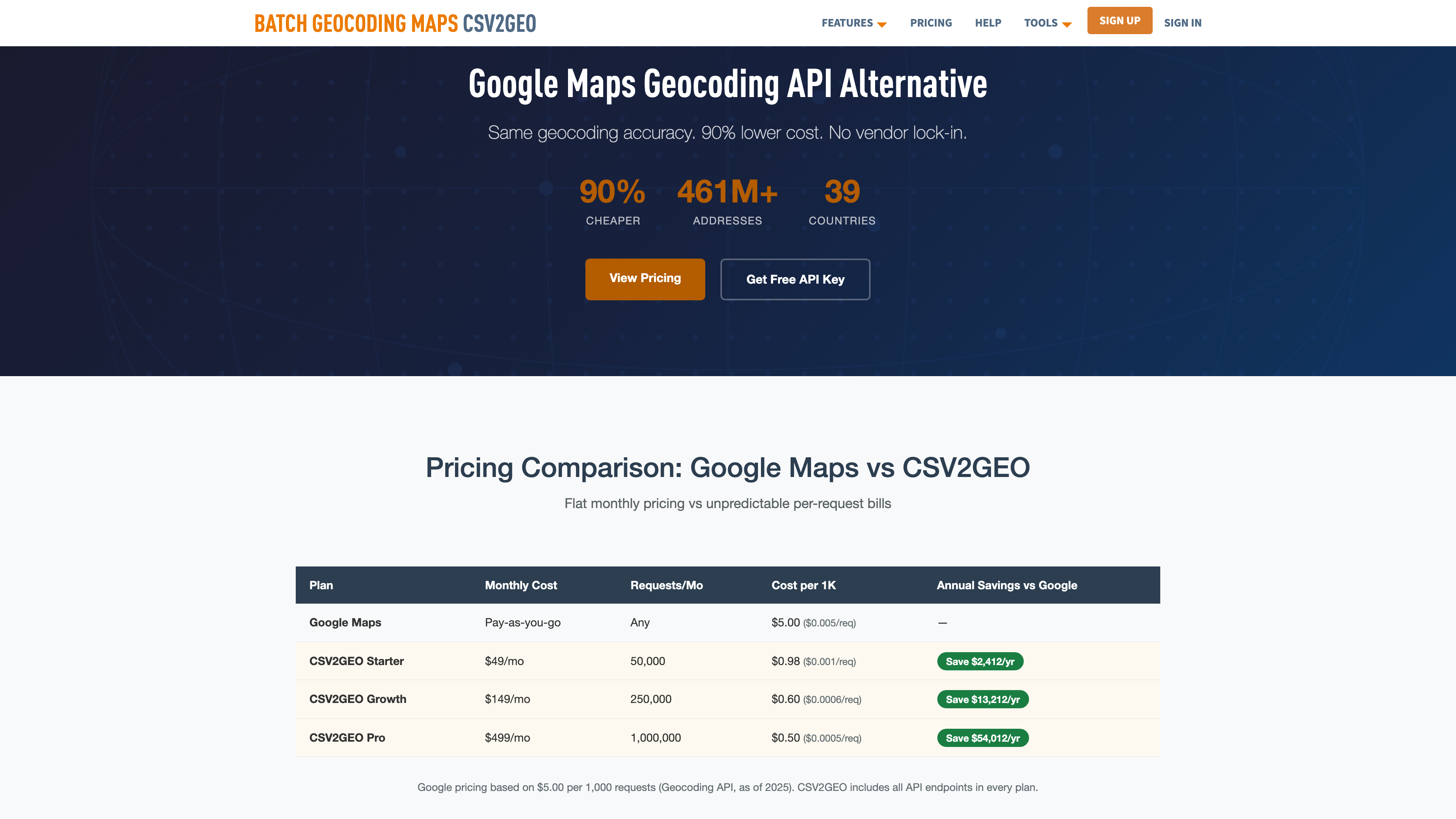
Yes. CSV2GEO offers a REST API with similar functionality at a fraction of the cost. Mapbox and HERE are also popular alternatives. Open-source self-hosted options also exist for teams with infrastructure.
Which geocoding tool supports the most countries?
Google and Mapbox support 200+ countries. HERE covers 200+ countries with strong European data. CSV2GEO covers 63 countries with 744M+ addresses. Geocodio and Smarty cover US and Canada only.
Try CSV2GEO Free
Ready to geocode your addresses? Upload your CSV file for batch geocoding and get coordinates in minutes. No credit card, no code, 100 addresses free every day.
Need more? Check out our batch geocoding plans, explore the geocoding API, or read our how to geocode a CSV file.
I.A.
CSV2GEO Creator
Related Articles
Use our batch geocoding tool to convert thousands of addresses to coordinates in minutes. Start with 100 free addresses.
Try Batch Geocoding Free →