CSV2GEO vs Google Maps Geocoding API: An Honest Comparison
CSV2GEO vs Google Maps Geocoding API: honest comparison of pricing, batch processing, 18 endpoints, ToS restrictions, and code examples. See where each wins.
A geocoding API converts street addresses into latitude and longitude coordinates via HTTP requests. Google Maps and CSV2GEO are two of the most popular geocoding APIs in 2026, but they serve different use cases. Google Maps is the default choice for developers already in the Google ecosystem. CSV2GEO is built for batch processing, CSV file uploads, and teams that need affordable global coverage without credit card requirements or Terms of Service restrictions on how they use the results.
But “default” does not mean “best for every use case.” Google’s geocoding API was designed for real-time, one-at-a-time lookups tied to a Google Maps display. If your workflow involves batch processing CSV files, storing results in a database, or geocoding without a credit card on file, Google’s model creates friction that other services eliminate.
This is an honest comparison. We will tell you where Google wins, where CSV2GEO wins, and help you decide which fits your specific needs.
Where Google Maps Wins
Let us start with Google’s genuine advantages. If we are going to call this honest, Google deserves credit where it is due.
Brand Trust and Ecosystem
Google Maps is a household name. When you tell a stakeholder “we use Google Maps for geocoding,” nobody questions it. That institutional trust has real value, especially in enterprise environments where vendor selection involves procurement teams and security reviews.
If your application already runs on Google Cloud Platform, using Google Maps geocoding means one fewer vendor, one consolidated bill, and native integrations with BigQuery, Cloud Functions, and other GCP services.
Documentation and Community
Google’s geocoding documentation is extensive, well-organized, and maintained by a dedicated team. Stack Overflow has tens of thousands of answers for Google Maps geocoding questions. Every programming language has a mature client library. When you hit a problem at 2 AM, the answer is almost certainly already on the internet.
Places Autocomplete
Google’s autocomplete — the “type-ahead” that suggests addresses as you type — is best in class. If your application needs a search bar where users enter addresses with autocomplete suggestions, Google’s implementation is polished, fast, and familiar to users.
CSV2GEO also offers an autocomplete endpoint (GET /v1/autocomplete) for type-ahead address suggestions. While Google’s autocomplete has deeper point-of-interest and business name coverage, CSV2GEO’s autocomplete handles street addresses across 200+ countries and is included in the same API key — no separate Places API billing required.
Global Point-of-Interest Coverage
Google Maps excels at geocoding business names like "Starbucks near Times Square." CSV2GEO also covers points of interest — with 75M+ POIs in its database — so searches like "Empire State Building" do return results. Google’s POI database is larger and includes real-time business data (hours, reviews, photos), but for location-based POI geocoding, both services deliver.
Where CSV2GEO Wins
Now the other side.
No Credit Card Required
To use Google Maps geocoding, you must create a Google Cloud billing account and attach a credit card. Even to access the free 10,000 requests per month. Even to make a single test request.
CSV2GEO’s free tier — 100 rows/day via file upload and 1,000 API requests/day — requires only an email address. No credit card, no billing account, no Cloud Console configuration. Sign up, get an API key at csv2geo.com/api-keys, and start geocoding.
CSV Upload: Zero Code Required
Google’s geocoding API is an API. To geocode a CSV file, you need to write code: read the file, loop through rows, call the API, handle rate limits, parse responses, write results back. Minimum viable implementation: 50–100 lines of Python.
CSV2GEO has a browser-based upload tool that accepts CSV and Excel files directly. Upload, map your columns, wait for processing, download results. Total code required: zero.
For non-technical users — analysts, real estate agents, researchers, small business owners — this is not a minor convenience. It is the difference between “possible” and “actually going to happen.”
Batch API: 10,000 Addresses Per Request
Google’s Geocoding API processes one address per request. If you need to geocode 100,000 addresses, you make 100,000 API calls, each with network overhead, rate limit management, and error handling.
CSV2GEO’s batch endpoint processes up to 10,000 addresses per single API request. That same 100,000-address job becomes 10 API calls instead of 100,000. The reduction in network overhead alone makes batch processing 20–40x faster.
| Metric | Google Maps | CSV2GEO |
|---|---|---|
| Addresses per request | 1 | Up to 10,000 |
| API calls for 100K addresses | 100,000 | 10 |
| Rate limit management | Required | Minimal |
| Estimated processing time | 2–4 hours | 5–15 minutes |
No Terms of Service Restrictions on Results
This is the one that catches most developers by surprise.
Google’s Terms of Service require that geocoding results be displayed on a Google Map. Section 3.2.3(a) of the Google Maps Platform Terms states that you may not use Google geocoding results “without a corresponding Google Map.” If you are storing coordinates in a database for analytics, route optimization, or any purpose that does not involve displaying a Google Map, you may be in violation.
CSV2GEO has no such restriction. Geocode addresses, store the coordinates, use them however you want — in your own maps, in analytics dashboards, in machine learning models, in printed reports. The coordinates are yours.
Pricing at Scale
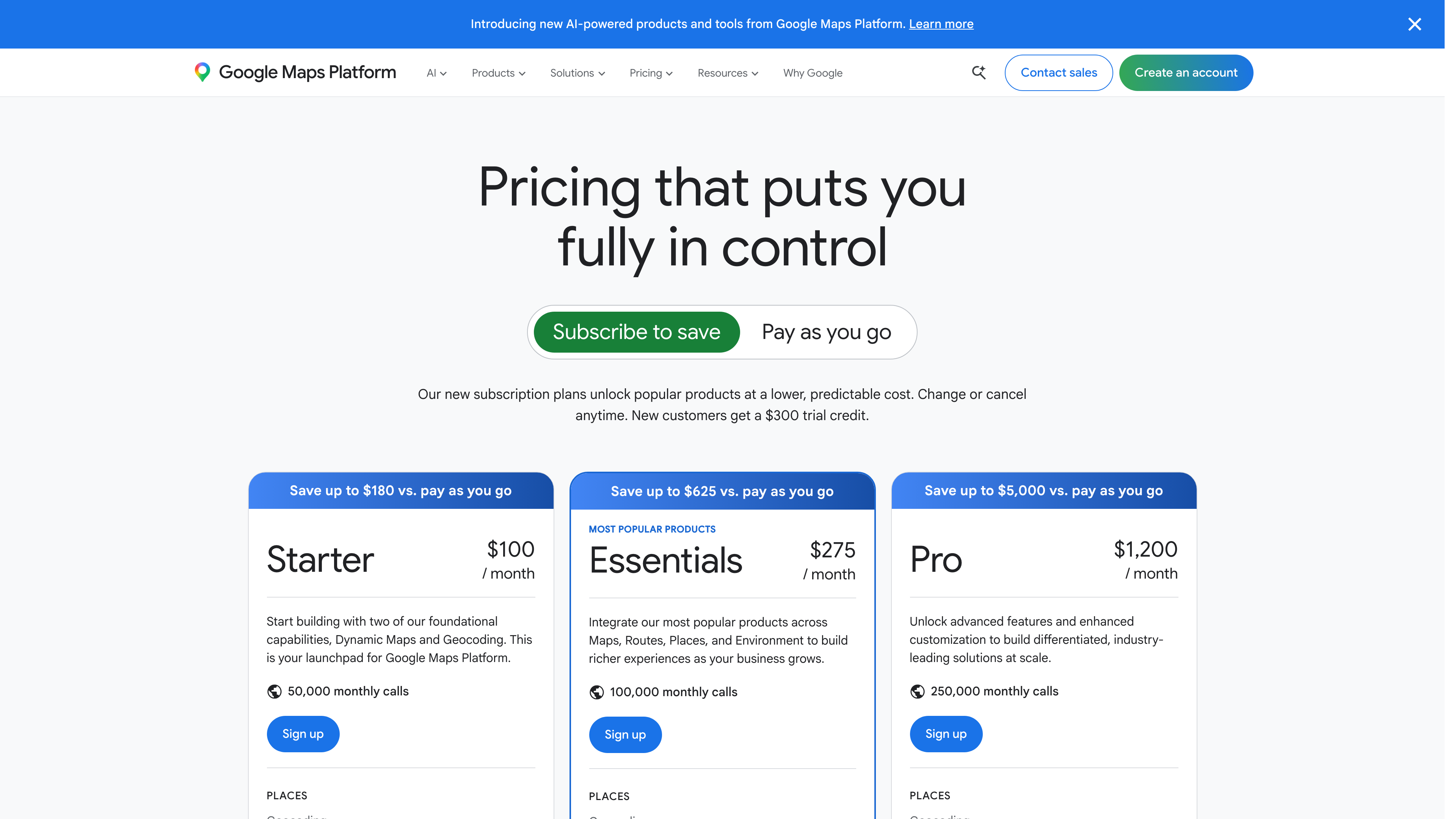
Google charges $5 per 1,000 requests after the first 10,000 per month, dropping to $4 per 1,000 above 100,000. Beyond that, costs escalate linearly.
| Monthly Volume | Google Maps Cost | CSV2GEO Cost |
|---|---|---|
| 10,000 | $0 (within credit) | $0–$14.99 |
| 50,000 | $50 | $14.99 |
| 100,000 | $300 | $14.99–$49.99 |
| 500,000 | $2,300 | $49.99–$99.99 |
| 1,000,000 | $4,800 | $99.99–custom |
At 500,000 requests per month, CSV2GEO saves you about $1,950 per month compared to Google. Over a year, that is more than $23,000.
For a detailed breakdown across all major geocoding services, see our geocoding API pricing comparison.
Side-by-Side Code Examples
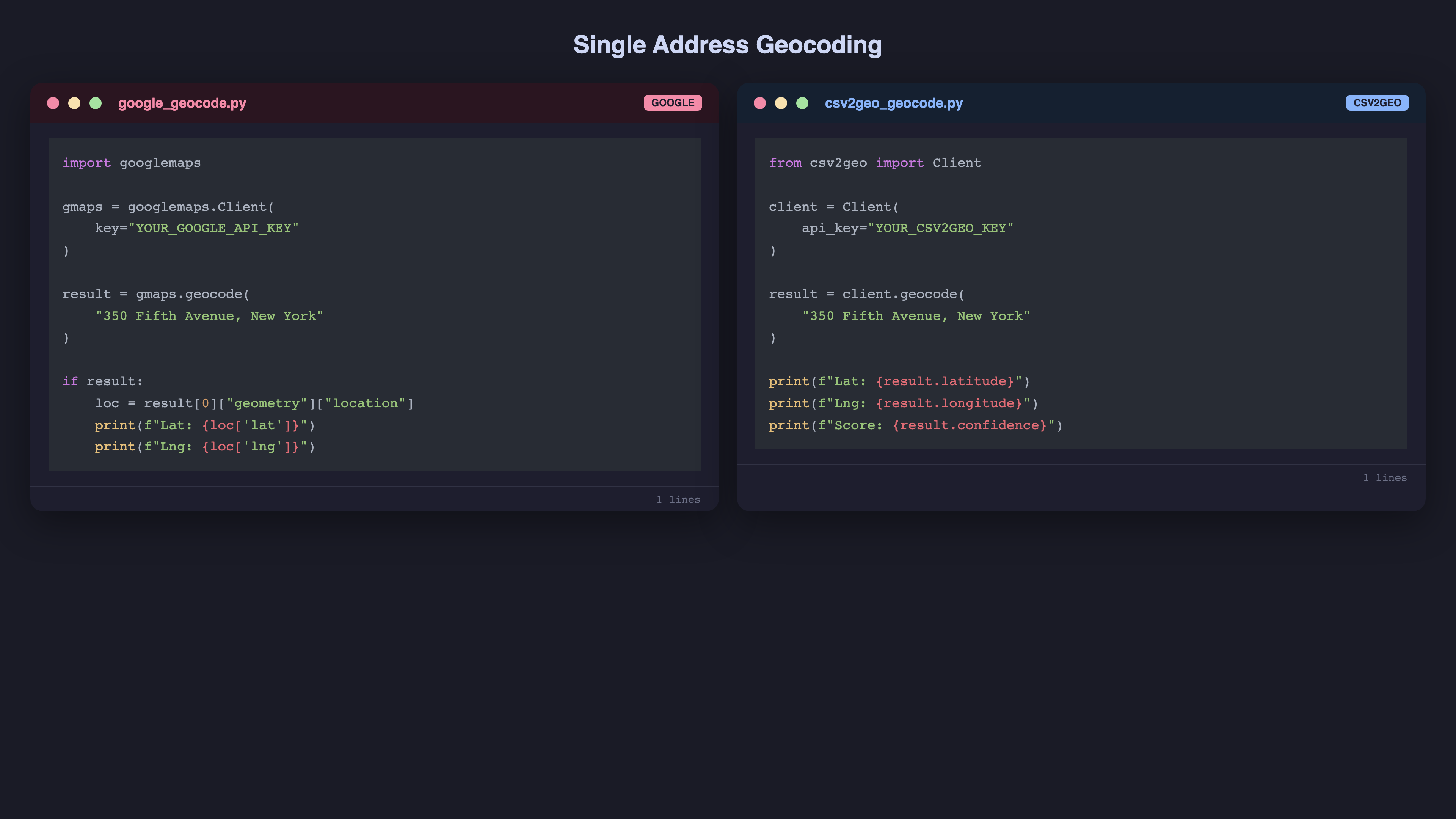
Single Address Geocoding
Google Maps (Python):
import googlemaps

gmaps = googlemaps.Client(key="YOUR_GOOGLE_API_KEY")

result = gmaps.geocode("350 Fifth Avenue, New York, NY 10118")

if result:
    location = result[0]["geometry"]["location"]
    print(f"Lat: {location['lat']}, Lng: {location['lng']}")
CSV2GEO (Python):
from csv2geo import Client

client = Client(api_key="YOUR_CSV2GEO_API_KEY")

result = client.geocode("350 Fifth Avenue, New York, NY 10118")
print(f"Lat: {result.latitude}, Lng: {result.longitude}")
Both are simple. Google returns a nested dictionary; CSV2GEO returns an object with direct attribute access. Functional difference: minimal.
Batch Geocoding
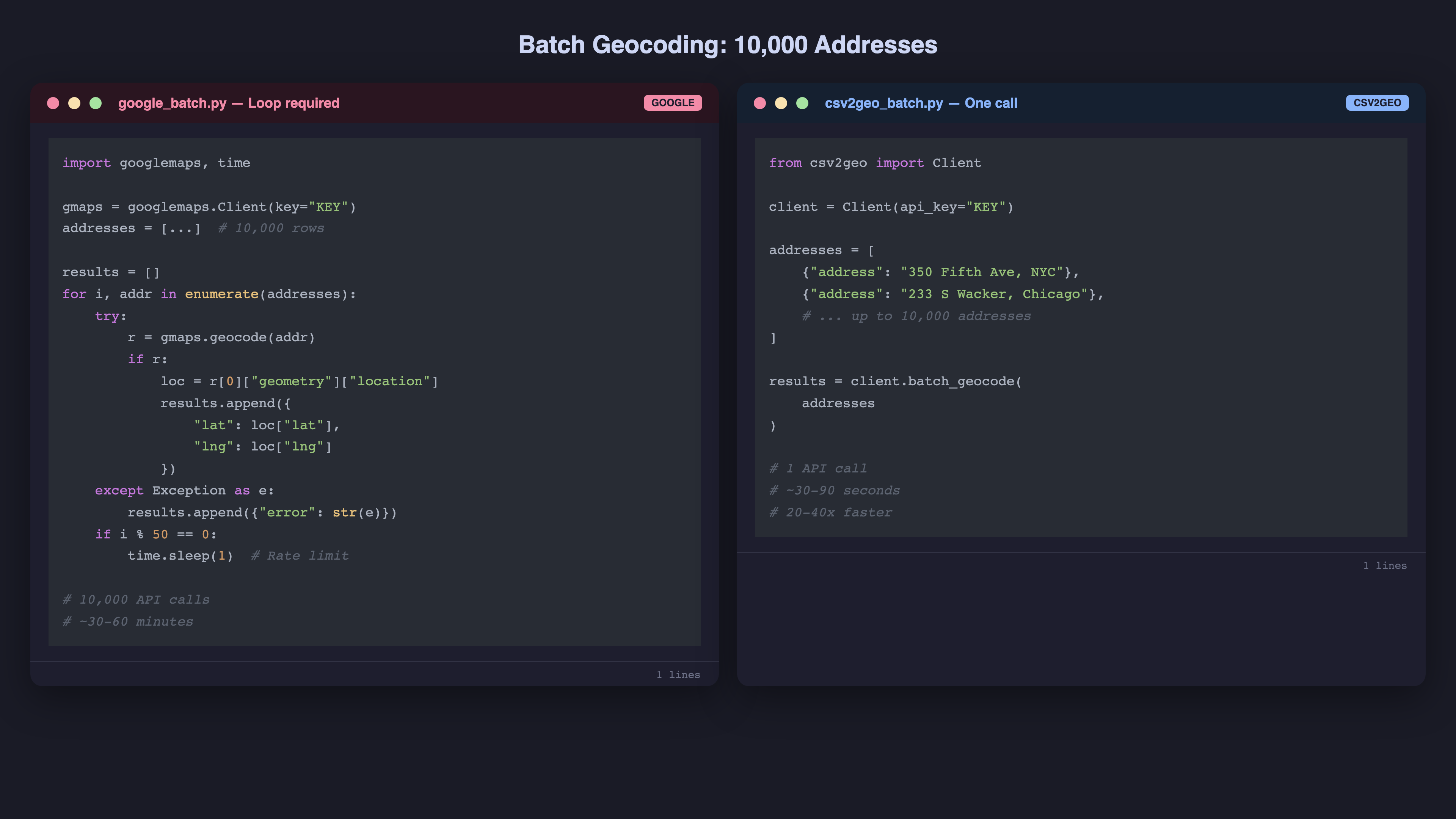
Google Maps (Python) — No native batch endpoint:
import googlemaps
import time

gmaps = googlemaps.Client(key="YOUR_GOOGLE_API_KEY")

addresses = ["350 Fifth Ave, NYC", "233 S Wacker Dr, Chicago", ...]  # 10,000 addresses

results = []
for i, addr in enumerate(addresses):
    try:
        result = gmaps.geocode(addr)
        if result:
            loc = result[0]["geometry"]["location"]
            results.append({"address": addr, "lat": loc["lat"], "lng": loc["lng"]})
    except Exception as e:
        results.append({"address": addr, "lat": None, "lng": None, "error": str(e)})

    # Respect rate limits
    if i % 50 == 0:
        time.sleep(1)
CSV2GEO (Python) — Native batch endpoint:
from csv2geo import Client

client = Client(api_key="YOUR_CSV2GEO_API_KEY")

addresses = [
    {"address": "350 Fifth Ave, NYC"},
    {"address": "233 S Wacker Dr, Chicago"},
    # ... up to 10,000 addresses
]

results = client.batch_geocode(addresses)
The difference is stark. Google requires a loop, rate limit handling, error catching, and sleep delays. CSV2GEO processes the entire batch in one call.
Data Ownership and Terms of Service
This is the difference that matters most for many teams — and the one most comparisons skip.
Google Maps Terms of Service restrict how you can use geocoding results. Under the Google Maps Platform Terms, geocoded data must be used in connection with Google Maps. You cannot store results indefinitely for use outside Google Maps without displaying them on a Google Map. This affects analytics teams, data warehousing, and any application where coordinates feed into non-map systems like route optimization engines, CRM enrichment, or spatial databases.
CSV2GEO has no usage restrictions. Once you geocode your addresses, the results are yours. Store them in your database, feed them into any routing engine, use them in Excel, import into QGIS or Tableau, or build your own map with Leaflet or Mapbox GL — no restrictions. There is no requirement to display results on any specific map platform.
For many businesses, this is not a minor detail. If your primary use case is enriching a customer database with coordinates for territory planning, or feeding coordinates into a route optimization engine, Google’s ToS technically prohibits this without also displaying the data on a Google Map. CSV2GEO lets you use the data however you need.
Real-World Migration: What Changes When You Switch
If you are currently using Google Maps geocoding and considering a switch, here is what actually changes:
- API endpoint — Replace maps.googleapis.com/maps/api/geocode with csv2geo.com/api/v1/geocode. The request/response structure is similar.
- Authentication — Replace your Google API key with a CSV2GEO API key from csv2geo.com/api-keys.
- Batch processing — Replace your geocoding loop with a single batch call. This is the biggest code simplification.
- Response format — Field names differ slightly. Map geometry.location.lat to latitude and geometry.location.lng to longitude.
- Error handling — Replace Google-specific error codes with CSV2GEO exceptions.
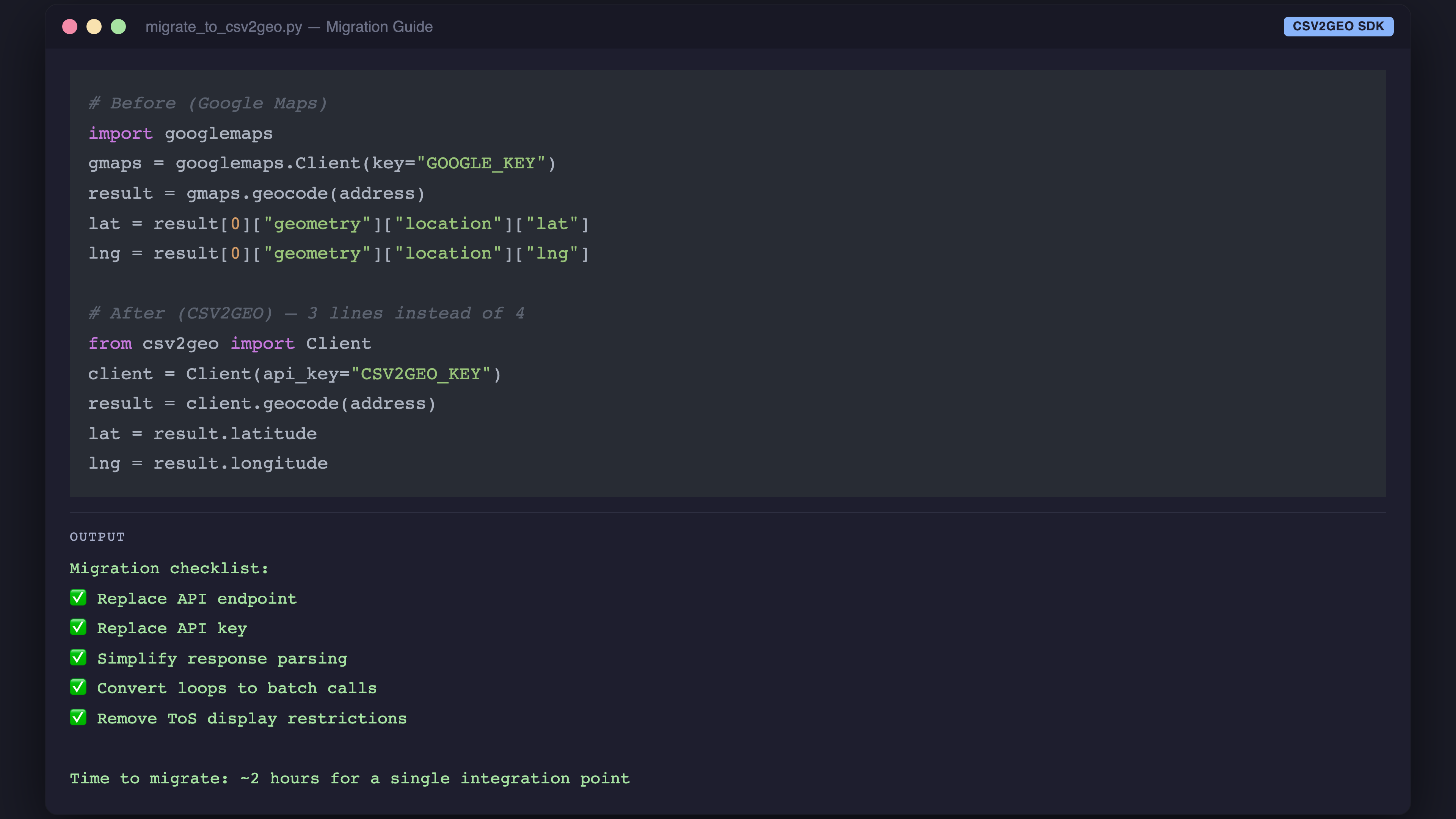
The migration is typically a few hours of work for a single integration point. The ongoing savings — both in API costs and engineering time — pay for the migration within the first month at any meaningful volume.
When to Choose Google Maps
Choose Google if:
- Your app displays a Google Map. If you are already paying for the Maps JavaScript API, adding geocoding is incremental — and the ToS requires it anyway.
- You need business name and POI autocomplete. Google’s type-ahead for businesses ("Starbucks near...") is unmatched. CSV2GEO’s autocomplete covers street addresses but not business name search.
- You are in a large enterprise with GCP. The consolidated billing, IAM integration, and vendor consolidation argument is legitimate.
- You need real-time business data (hours, reviews, photos). Google’s Places API includes live business information alongside geocoding. CSV2GEO covers 75M+ POIs for location geocoding but does not include business metadata.
When to Choose CSV2GEO
Choose CSV2GEO if:
- You process CSV or Excel files. The no-code upload tool means analysts, researchers, and non-developers can geocode without engineering support.
- You need batch processing. 10,000 addresses per API call versus one at a time. The math speaks for itself.
- Budget matters. At any volume above 40,000 requests per month, CSV2GEO is significantly cheaper.
- You want to store and reuse results freely. No ToS restrictions on how you use the coordinates.
- You do not want a credit card on file. Especially for testing, prototyping, or academic research.
Migrating from Google Maps to CSV2GEO
If you are currently using Google’s geocoding API and want to switch, the migration is straightforward.
Step 1: Get a CSV2GEO API Key
Sign up at csv2geo.com/api-keys. Free, no credit card.
Step 2: Install the SDK
pip install csv2geoStep 3: Replace the Client
# Before (Google)
import googlemaps
gmaps = googlemaps.Client(key="GOOGLE_KEY")
result = gmaps.geocode(address)
lat = result[0]["geometry"]["location"]["lat"]
lng = result[0]["geometry"]["location"]["lng"]

# After (CSV2GEO)
from csv2geo import Client
client = Client(api_key="CSV2GEO_KEY")
result = client.geocode(address)
lat = result.latitude
lng = result.longitude
Step 4: Convert Loops to Batch Calls
If your code loops through addresses one at a time, refactor to use client.batch_geocode() for 20–40x faster processing.
Step 5: Remove Google Maps ToS Constraints
If you were storing geocoded results only because they were displayed on a Google Map, you can now store and use them freely — in your own database, analytics tools, or any third-party system.
For a hands-on migration with working code, see our [Link: Python geocoding guide | https://csv2geo.com/blog/how-to-geocode-addresses-in-python].
The Bottom Line
Google Maps is excellent software. It is also expensive, restrictive, and designed for a use case (real-time, one-at-a-time, displayed on Google Maps) that does not match how many teams actually use geocoding.
If your workflow involves batch processing, CSV files, budget constraints, or freedom to use results however you want, CSV2GEO is built specifically for that.
Try both. CSV2GEO’s free tier does not require a credit card, so there is zero risk in running your own comparison. Upload a CSV at csv2geo.com/batchgeocoding, compare the results against Google, and decide for yourself.
Frequently Asked Questions
Is CSV2GEO as accurate as Google Maps geocoding?
CSV2GEO covers 744M+ addresses across 200+ countries with house-number-level precision. For street addresses, accuracy is comparable. Google has an edge for business names and points of interest. For structured address geocoding — which is the vast majority of batch use cases — CSV2GEO delivers equivalent results at a fraction of the cost.
Can I use CSV2GEO as a drop-in replacement for Google?
For geocoding and reverse geocoding, yes. The API input and output are different (different JSON structure), but the functionality is equivalent. The main adjustment is refactoring one-at-a-time calls to batch calls to take advantage of CSV2GEO’s batch endpoint. CSV2GEO includes autocomplete via the /v1/autocomplete endpoint, though Google’s autocomplete has deeper POI coverage.
Does Google Maps geocoding have a free tier?
Google provides 10,000 free Geocoding requests per month; the $200 monthly credit was withdrawn in March 2025. However, you must set up a billing account with a credit card to access it. There is no spending cap by default — if you exceed the credit, charges begin automatically.
What can I do with CSV2GEO results that I cannot do with Google results?
Google’s Terms of Service require geocoding results to be displayed on a Google Map. CSV2GEO has no such restriction. You can store coordinates in your database, use them in analytics dashboards, feed them to machine learning models, print them in reports, or use them with any mapping provider.
How much faster is CSV2GEO batch processing versus Google?
CSV2GEO processes up to 10,000 addresses per API request. Google processes one per request. For 100,000 addresses, Google requires 100,000 API calls (2–4 hours with rate limits); CSV2GEO requires 10 calls (5–15 minutes). That is roughly 20–40x faster in practice.
Can I use both Google Maps and CSV2GEO together?
Yes. Many teams use Google Maps for the frontend (map display, autocomplete) and CSV2GEO for backend batch processing. This combination gives you Google’s user-facing polish with CSV2GEO’s batch efficiency and cost savings.
I.A.
CSV2GEO Creator
Related Articles
Use our batch geocoding tool to convert thousands of addresses to coordinates in minutes. Start with 100 free addresses.
Try Batch Geocoding Free →