Lat Long Lookup: How to Find Latitude and Longitude for Any Address
Free lat long lookup tool — find latitude and longitude for any address instantly. Single lookup, bulk CSV/Excel upload, or API. Rooftop accuracy, 240+ countries.
A lat long lookup is the process of finding the latitude and longitude coordinates for a specific location. You start with something human-readable — a street address, a city name, a ZIP code — and get back the two numbers that pinpoint that place on Earth. The reverse works too: start with coordinates and find the address.
This is one of the most common tasks in mapping, logistics, data analysis, and app development. Every time you search for a restaurant on Google Maps, track a delivery, or plot customer locations on a dashboard, a lat long lookup is happening behind the scenes.
This guide covers every way to look up latitude and longitude — from a single address to bulk file processing to programmatic API calls. Whether you need to find coordinates for one location or ten thousand, you will know exactly how to do it by the end.
What Are Latitude and Longitude?
Latitude and longitude form the geographic coordinate system — a pair of numbers that uniquely identifies any point on Earth. Latitude measures how far north or south a point is from the equator (0° at the equator, +90° at the North Pole, −90° at the South Pole). Longitude measures how far east or west a point is from the Prime Meridian in Greenwich, London (0° at Greenwich, +180° going east, −180° going west).
Together, these two numbers create an address system that works everywhere — from downtown Manhattan to the middle of the Pacific Ocean. Unlike street addresses, which are local conventions that vary by country and break down in rural or unmapped areas, latitude and longitude are universal. Any GPS device, mapping application, or spatial database on the planet speaks this language.
Coordinates are usually written in decimal degrees — for example, 40.7128, -74.0060 for New York City. The first number is latitude (40.71° north of the equator), the second is longitude (74.01° west of the Prime Meridian, indicated by the negative sign). This is the format that every modern tool expects.
How to Look Up Lat Long for Any Address
There are three practical ways to perform a lat long lookup, depending on how many locations you need and whether you want to do it manually or programmatically.
Method 1: Single Lat Long Lookup (Free, Instant)
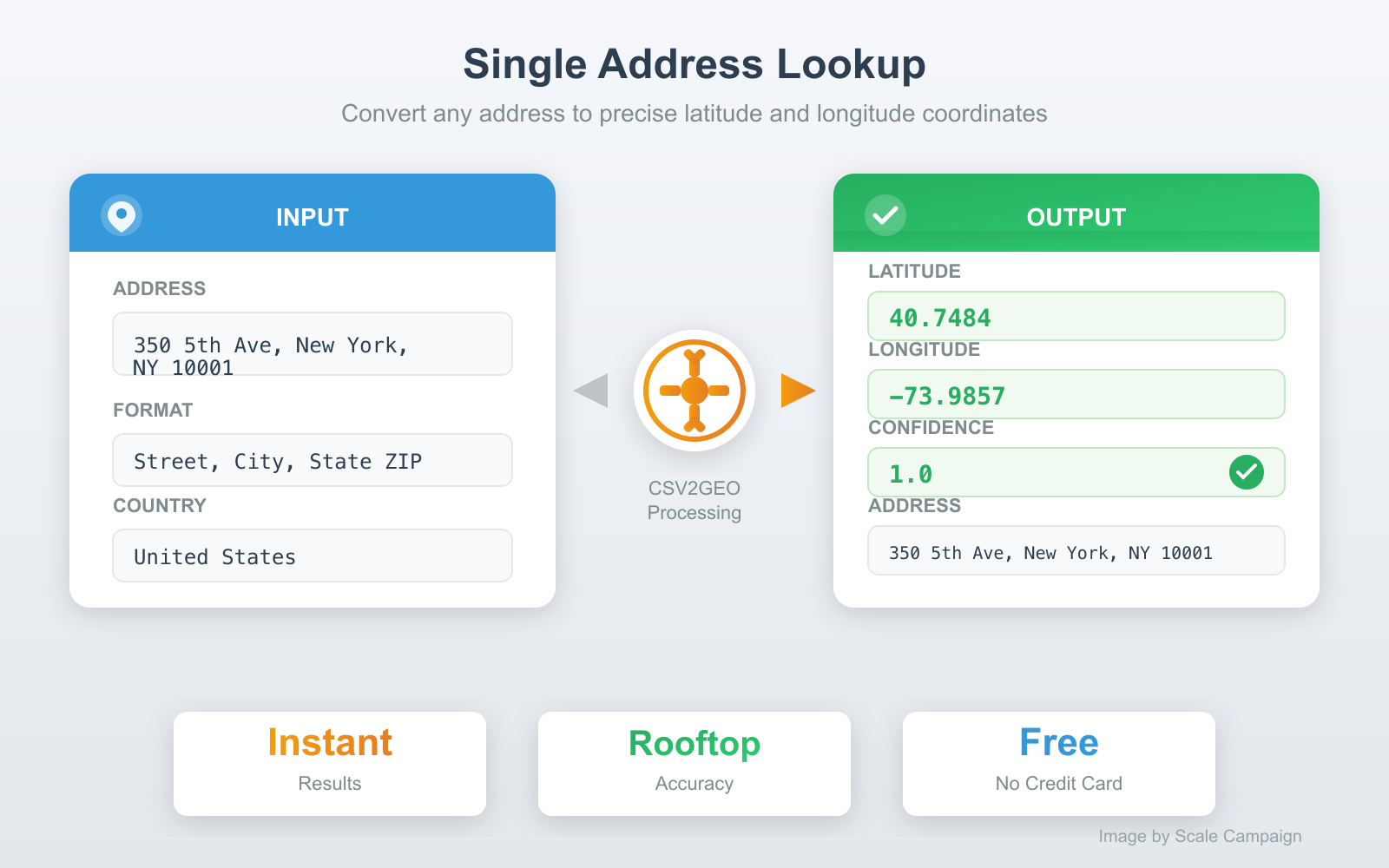
The fastest way to find the latitude and longitude of a single address. Go to CSV2GEO, type or paste your address, and click Go. You get coordinates back in seconds — along with a confidence score that tells you how precise the match is.
A confidence score of 1.0 means rooftop accuracy — the coordinates point directly to the building. A score of 0.6 might mean the system matched on the street or postal code but could not pinpoint the exact building. For most lookups with a complete address (street number, city, state, ZIP), you will get rooftop accuracy.
This method works for quick checks — verifying a single address, looking up coordinates for a meeting location, or confirming where a GPS point actually is. No account required for single lookups.
Method 2: Bulk Lat Long Lookup (CSV or Excel)
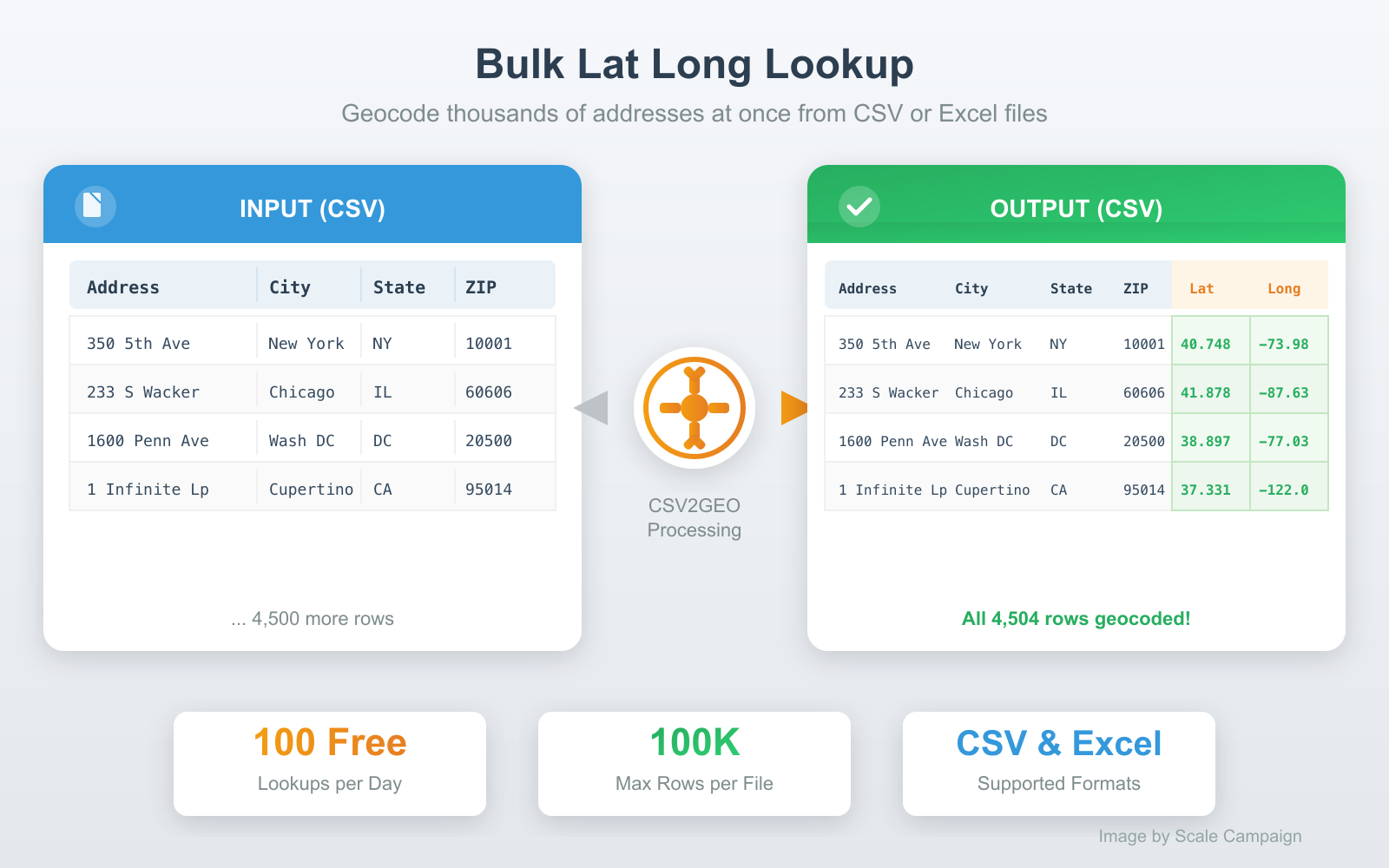
When you have dozens, hundreds, or thousands of addresses to look up, doing them one at a time is not realistic. A bulk lat long lookup processes your entire file at once — upload a spreadsheet, get coordinates for every row.
Here is how it works:
- Prepare your file. Your addresses can be in a single column ("350 5th Ave, New York, NY 10001") or split across separate columns (street, city, state, ZIP). CSV and Excel (.xlsx) formats are both supported.
- Upload to CSV2GEO. Drag and drop your file at csv2geo.com/batchgeocoding. The system previews your data and auto-detects which columns contain address components.
- Confirm and process. Verify the column mapping, then click Process Data to preview the first 10 results. If everything looks correct, click Get All Data to process the full file.
- Download results. Your original file comes back with latitude, longitude, and accuracy scores appended as new columns. All your original data stays intact.
The free tier handles 100 lat long lookups per day — no credit card required. For larger volumes, pay-as-you-go pricing starts at $0.50 per 1,000 lookups. A 10,000-row file processes in about two minutes.
Method 3: Lat Long Lookup via API
For developers building lat long lookup into an application, a data pipeline, or an automation workflow, the CSV2GEO geocoding API provides programmatic access. Send an address, get coordinates back as JSON.
Python example:
from csv2geo import Csv2Geo

client = Csv2Geo(api_key="your-api-key")

# Single lookup
result = client.geocode("350 5th Ave, New York, NY 10001")
print(result.lat, result.lng)
# Output: 40.7484 -73.9857

# Batch lookup (up to 10,000 per request)
results = client.batch_geocode([
    "1600 Pennsylvania Ave, Washington DC",
    "221B Baker Street, London, UK",
    "Tour Eiffel, Paris, France"
])
for r in results:
    print(f"{r.formatted_address}: {r.lat}, {r.lng}")
JavaScript example:
import { Csv2Geo } from 'csv2geo';

const client = new Csv2Geo({ apiKey: 'your-api-key' });

// Single lookup
const result = await client.geocode('350 5th Ave, New York, NY 10001');
console.log(result.lat, result.lng);
// Output: 40.7484 -73.9857
The API includes 1,000 free requests per day. Get your API key at csv2geo.com/api-keys. The batch endpoint handles up to 10,000 addresses in a single request.
Reverse Lat Long Lookup: Coordinates to Address
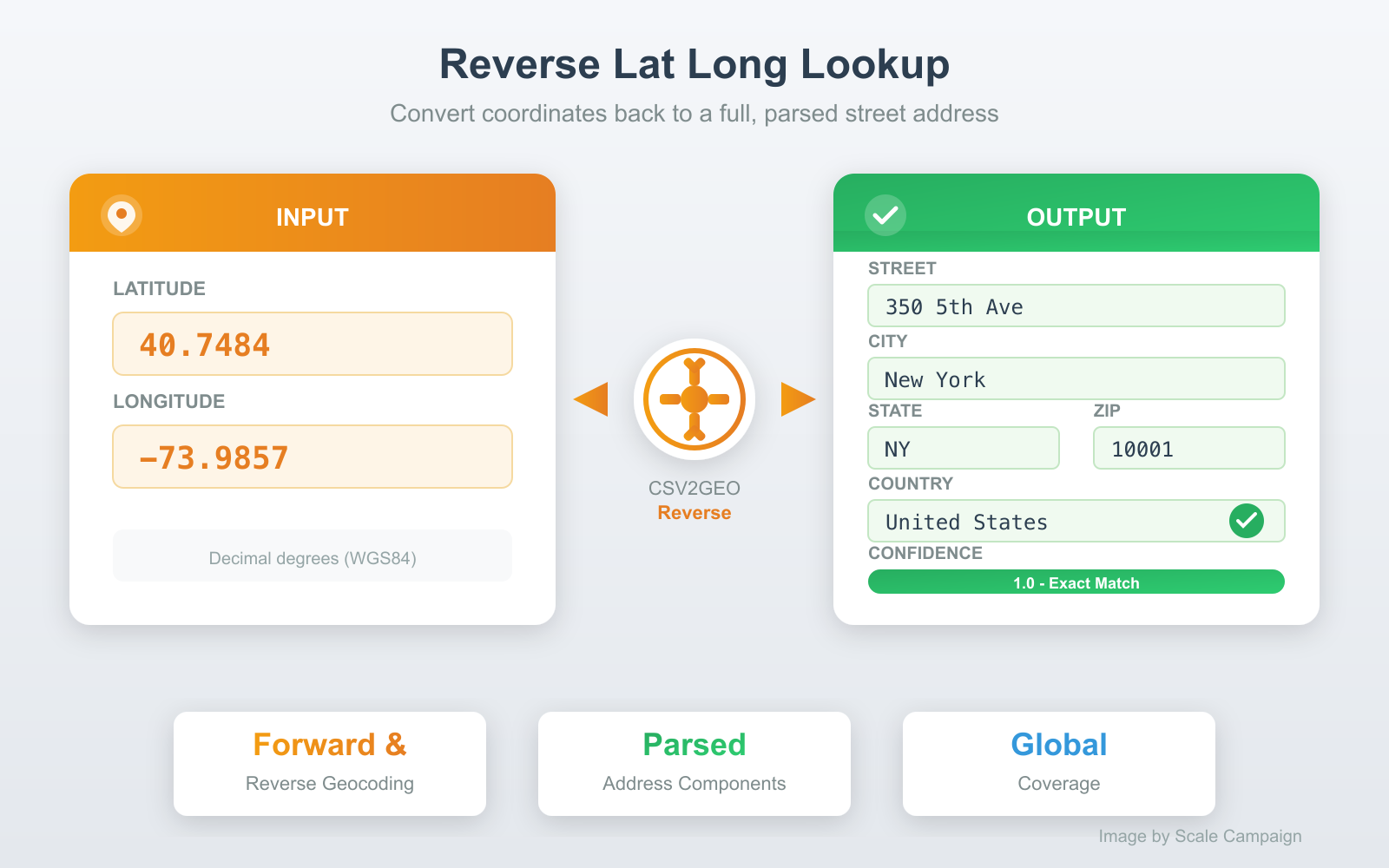
A lat long lookup works in both directions. Forward lookup converts an address to coordinates. Reverse lookup converts coordinates back to an address — also called reverse geocoding.
Reverse lookups are essential when you have GPS coordinates — from fleet trackers, mobile devices, IoT sensors, drone surveys, or geotagged photos — and need to know what street address those coordinates correspond to.
The process is identical to a forward lookup. Upload a file with latitude and longitude columns (or type coordinates directly), and CSV2GEO returns full street addresses: street number, street name, city, state, postal code, and country — each in its own column. See the reverse geocoding guide for a detailed walkthrough.
What Makes a Good Lat Long Finder
Not all lat long lookup tools are equal. The differences come down to four factors that determine whether you get a useful, accurate result or a frustrating approximation.
Accuracy level
The best lat long finders return rooftop-level coordinates — the point lands on the actual building, not in the middle of the street or the center of the city. Cheaper tools use address interpolation, which estimates the position along a street segment based on the house number range. Interpolated results can be off by 50-200 meters. CSV2GEO uses rooftop-level matching against a database of 744 million individually mapped addresses.
Global coverage
A lat long finder that only covers the United States is useless for international addresses. Many tools — including the US Census Geocoder and Geocodio — are limited to North America. CSV2GEO covers 240+ countries, with the deepest coverage in the US, Brazil, Mexico, France, Italy, and Germany. If your data includes addresses from multiple countries, make sure your tool can handle them all.
Batch processing
Looking up one address is easy. Looking up 10,000 is where tools diverge. A good lat long finder handles bulk lookups through file upload (CSV, Excel) or a batch API endpoint. It should preserve your original data and append coordinates as new columns — not force you to copy-paste results one by one.
Structured output
Raw coordinates alone are rarely enough. A good lat long lookup returns parsed address components alongside the coordinates: street, city, state, postal code, country, and a confidence score. This makes it easy to validate results, filter by region, or import directly into a database or CRM without additional parsing.
Common Use Cases for Lat Long Lookup
Mapping and visualization. Every mapping tool — Google Maps, Mapbox, Leaflet, Tableau, QGIS — requires latitude and longitude to place a marker. If your data has addresses but no coordinates, a lat long lookup is the first step before you can plot anything on a map.
Delivery and logistics. Route optimization engines need coordinates for every stop. Converting delivery addresses to lat long enables distance calculations, optimal route sequencing, and estimated arrival times. Fleets running 50-500 stops per day depend on batch lat long lookups to plan each day's routes.
Sales territory management. Assigning sales reps to geographic territories, mapping customer density, and identifying underserved areas all require geocoded addresses. A lat long lookup turns your CRM contact list into a map layer you can analyze, divide, and optimize.
Real estate and insurance. Property coordinates enable flood zone checks, school district lookups, comparable sales analysis, and risk scoring. Insurance companies geocode policyholder addresses to overlay with hazard maps. Real estate platforms geocode listings to power map-based property search.
Academic and government research. Epidemiological studies, crime pattern analysis, census data enrichment, and environmental monitoring all start with geocoding. Researchers convert address records to coordinates so they can apply spatial statistics, clustering algorithms, and heat map visualizations.
Data enrichment and validation. Lat long lookup doubles as an address validator. Addresses that fail to geocode are likely incomplete, misspelled, or fictitious. Running your database through a geocoder is one of the fastest ways to identify bad records — if a row returns no coordinates or a low confidence score, the address needs attention.
Tips for Accurate Lat Long Lookups
Include the house number. "350 5th Ave, New York" returns the exact building (Empire State Building). "5th Ave, New York" returns a point somewhere along a 4-mile avenue. The house number is the single most important field for rooftop accuracy.
Always specify the country. "Paris" matches Paris, France and Paris, Texas. "Springfield" exists in 34 US states. An explicit country code (US, GB, FR, DE) eliminates ambiguity and dramatically improves match accuracy.
Use separate columns when possible. Splitting addresses into street, city, state, and ZIP columns produces 10-15% higher match rates than a single combined address field. The geocoder does not need to guess where the city ends and the state begins.
Provide postal codes. A correct ZIP code narrows the search from an entire country to a few square kilometers. Even if the street name has a typo, a good postal code often recovers the correct match.
Remove delivery instructions. "c/o John Smith, Apt 4B, Ring buzzer #7, 350 5th Ave" — the extra text confuses the parser. Keep suite numbers in a separate field and strip out contact names, floor numbers, and delivery notes.
Frequently Asked Questions
What is a lat long lookup?
A lat long lookup is the process of finding the latitude and longitude coordinates for a specific location. You provide an address, place name, or other location identifier, and a geocoding tool returns the numeric coordinates that pinpoint that location on Earth. The term covers both forward lookups (address to coordinates) and reverse lookups (coordinates to address).
How do I find lat long for an address for free?
Go to CSV2GEO, type your address, and click Go. You get latitude, longitude, and a confidence score instantly. For multiple addresses, upload a CSV or Excel file — 100 lookups per day are free, no credit card required.
What is the best lat long finder for bulk addresses?
For bulk lat long lookups, CSV2GEO handles files up to 100,000 rows through a simple file upload. It returns rooftop-level coordinates across 240+ countries with parsed address components in separate columns. The free tier covers 100 rows per day. For a detailed comparison of tools, see our batch geocoding tools guide.
Can I do a reverse lat long lookup?
Yes. A reverse lat long lookup converts coordinates to an address. Upload a file with latitude and longitude columns to CSV2GEO's reverse geocoder, and get full street addresses back for every coordinate. Both directions — forward and reverse — are included in the free tier.
What coordinate format does a lat long lookup return?
CSV2GEO returns coordinates in decimal degrees using the WGS84 standard — the same format used by Google Maps, GPS devices, and all modern mapping software. Example: 40.7484, -73.9857. This format is ready to use in any mapping tool without conversion.
Do I need to install software for a lat long lookup?
No. CSV2GEO runs entirely online — no downloads, no plugins, no desktop software. Upload your file in any modern browser, get coordinates, download the results. Works on Windows, Mac, Linux, and Chromebooks.
Look Up Lat Long for Your Addresses Now
Ready to find latitude and longitude for your addresses? Try a single lookup for free, or upload a CSV/Excel file to batch process hundreds of addresses at once. 100 rows free every day, no credit card.
For developers, the geocoding API provides 1,000 free requests per day. For reverse lookups, use our reverse geocoding tool.
Need help? Visit our Help center or contact us.
Use our batch geocoding tool to convert thousands of addresses to coordinates in minutes. Start with 100 free addresses.
Try Batch Geocoding Free →